Sorry for late reply, there was a bug on the forum so I didn't get a notification about your post. Very sorry about that.
I'm assuming you are Windows? I think this is a bug involving the Arduino IDE and how Windows handles COM ports. Basically when you program the Quarto, it reboots and briefly its USB connection disappears. It then re-appears. The Arduino IDE should re-set the programming port to what it was set to before when the Quarto re-appears. But if the Windows takes too long to enumerate USB or sometimes puts the Quarto's two ports out of order, the IDE gives up reconnecting to the original port and instead sets it to some other port (in your case COM1) as the programming port. Then when you click upload, it tries to program on COM1 at if fails. You should be able to fix this by going to Tools, Port and selecting the right port under 'qnimble ports'.
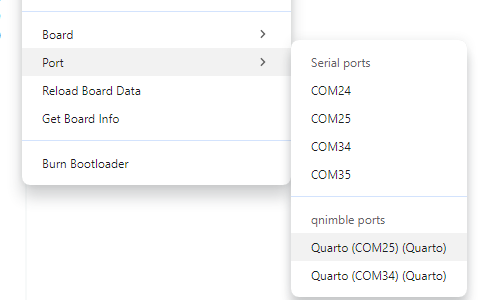
Sadly, after any reprograming, there's a chance this will happen again. If you look in the lower right, the IDE will show what port it is set to and if that changes to COM1, you'll know you need to reset it.

I'm sorry I don't have a better solution right now. I have a bug report in the Arduino IDE, but it has stalled.
One work-around is to use the command line tool for Arduino, arduino-cli to compile / upload instead. With that you can run on the command line:
arduino-cli.exe compile -b qnimble:imxrt:quarto YourProgram.ino && arduino-cli.exe upload -b qnimble:imxrt:quarto YourProgram.ino -p COMXX
and it will compile and then upload your sketch to the port you select.
I hope this helps. I think this is what's going on with your first issue. With the second, its hard to say if it seems to be working on one computer and not another. If you are using a USB hub, I would try connecting to the Quarto directly to the computer and see if that makes a difference. I've occasionally seen issues with some USB hubs doing weird things to device communication. Also, when this happens, does Windows give you a message about a USB device failure? If so, what is the message?